Control many agents.
Ignore every quota.
群控多个 Agent,
无视额度上限。
OpusChat gives Cursor two superpowers — orchestrate multiple agents from one panel, and a no-quota engine that auto-retries past every rate limit, so generation never stops.
OpusChat 给 Cursor 两大利器——一个面板群控多个 Agent,外加无额度引擎自动重试、越过一切限流,让生成永不中断。
Local-first · One-click install · License-key activation, ready to use本地优先 · 一键安装 · 卡密授权,即买即用
Quota used up? It keeps going.
额度用尽?它照样跑。
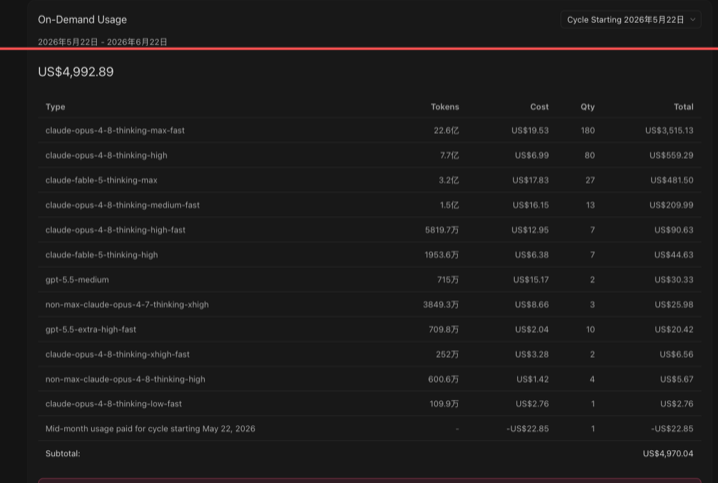
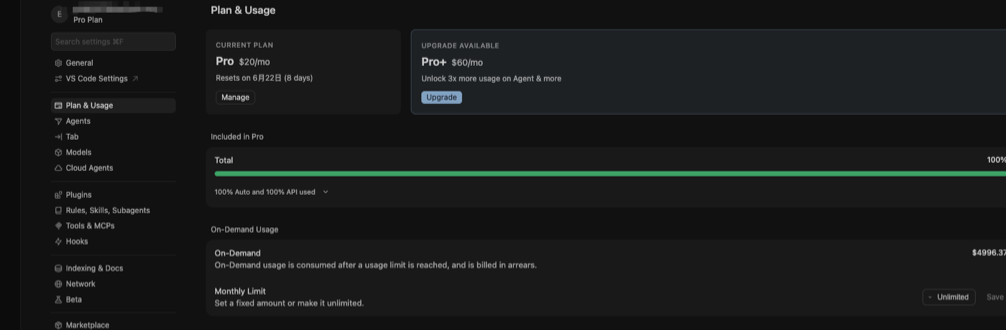
Real Cursor billing screens from OpusChat — generation never stopped at the limit, on-demand usage just kept flowing.
来自 OpusChat 的真实 Cursor 账单截图——到了上限也没停下,On-Demand 用量一路持续累积。
Push Cursor further — solo or as a team
把 Cursor 用到极致——一个人,或一支团队
A no-quota retry engine that never stops, plus a panel to command multiple agents at once.
永不停机的无额度重试引擎,加上一个能同时指挥多个 Agent 的面板。
Multi-agent control
多 Agent 群控
Manage multiple Cursor agents from one panel — send messages, assign tasks, broadcast to the group.
一个面板统一管理多个 Cursor Agent,发消息、分派任务、群发广播,一处指挥。
No-quota auto-retry
无视额度 · 自动重试
Hit a rate limit, quota or billing error and the engine auto-resubmits until the request goes through — generation simply doesn't stop.
遇到限流、额度用尽或账单报错,引擎自动重新提交,直到请求通过——生成根本不会停。
Message bus
消息总线
Agents exchange messages and collaborate in real time; progress and results are visible in the panel.
Agent 之间实时收发消息、互相协作,进度与结果在面板里清晰可见。
Groups & orchestration
群组与编排
Organize agents into groups by role so complex tasks move forward in order.
把多个 Agent 编成小组,按角色分工,复杂任务也能有序推进。
Local account management
本地账号管理
Save and quickly switch between your own logins locally — no repeated sign-ins.
在本地保存并快速切换你自己的多个登录态,省去反复登录的麻烦。
Local-first
本地优先
The panel and messaging run locally — fast, install-and-go, your workflow stays on your machine.
面板与消息走本地,安装即用、响应快,工作流尽量留在你自己的机器上。
How it works
怎么用
Get a license
获取授权卡
Pick a duration on the pricing page; after payment you instantly receive a license key.
在定价页选择合适的时长,付款后立即拿到一串卡密(授权卡)。
Install the plugin
安装插件
Install the OpusChat panel in Cursor and finish the quick setup.
在 Cursor 里安装 OpusChat 面板,按提示完成初始化。
Activate with your key
填卡激活
Enter the key in the panel to activate. The timer starts only on first activation; you can transfer it to a new device.
把卡密填进面板即可激活使用,首次激活才开始计时,换机可接管。
Pro account note: OpusChat works with Cursor's official API path, and usage/billing is real. For heavy sessions, use a dedicated Cursor Pro account that you can retire later. If you need one, support can provide a dedicated Pro account for $15/month. Pro 账号说明:OpusChat 调用的是 Cursor 官方 API 路径,使用与计费都是真实发生的。重度使用时,请使用一个后续可弃用的专用 Cursor Pro 账号。如有需要,支持可提供专用 Pro 账号,价格为 $15/月。